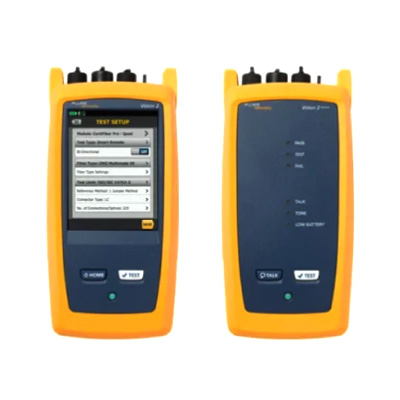
Fluke OptiFiber® Pro OTDR Family
Analyze Fiber Networks with Precision and Confidence


The Fluke OptiFiber® Pro OTDR Family is a professional fiber optic testing solution designed to analyze optical links, locate faults, and evaluate the performance of installed fiber networks. When researching the Fluke OptiFiber® Pro OTDR Family Price in Bangladesh, telecommunications engineers, fiber optic contractors, and network infrastructure professionals should consider its diagnostic capabilities and suitability for modern optical installations. An optical time domain reflectometer sends light pulses through a fiber and analyzes the returned signals to identify events along the link. This allows technicians to investigate fiber breaks, connector problems, splice losses, and other conditions that may affect network performance. The OptiFiber Pro family supports fiber characterization and troubleshooting for enterprise networks, data centers, and telecommunications infrastructure, helping professionals make informed maintenance and installation decisions.
Optical time domain reflectometry is an important technique for analyzing fiber optic links without relying solely on end to end loss measurements. The Fluke OptiFiber Pro uses optical pulses and reflected signals to generate a trace that represents events along a fiber. By interpreting this trace, technicians can identify the location of connectors, splices, bends, breaks, and other events that influence optical transmission. The resulting information helps users understand the condition of a fiber link and investigate the causes of excessive attenuation or signal reflection. This capability is valuable when troubleshooting newly installed cabling system and maintaining existing optical infrastructure. Accurate measurements depend on appropriate test settings, suitable launch and receive fibers, correct wavelength selection, and proper interpretation of the OTDR trace.
Locating a fiber fault can be challenging when cables pass through multiple rooms, cabinets, conduits, or outdoor routes. The Fluke OptiFiber Pro OTDR Family helps technicians estimate the distance to events along a fiber link, making it easier to narrow down the location of a suspected problem. It can assist in identifying breaks, high loss events, connector reflections, and other abnormalities that may require further investigation. This is particularly useful when a link experiences connectivity issues or fails optical performance testing. By examining the trace, technicians can determine where additional inspection or repair may be necessary. OTDR results should be interpreted alongside other measurements because certain events may require connector inspection, optical loss testing, or physical examination to confirm the underlying cause.
Connectors and fusion splices are important components of a fiber optic installation, and their quality can influence the total optical loss of a link. The Fluke OptiFiber Pro helps technicians evaluate events associated with connectors and splices by analyzing changes in the returned optical signal. This information supports the investigation of excessive loss, poor connections, and installation defects. It can also help professionals verify the quality of repair work and identify locations that may require attention. For reliable analysis, connectors should be inspected and cleaned before testing, and the appropriate launch and receive fibers should be used where required. Combining OTDR traces with end to end optical loss measurements provides a more complete understanding of fiber link performance.
The Fluke OptiFiber Pro family includes configurations designed for different fiber testing requirements. Depending on the selected model and installed modules, the platform can support multimode or singlemode fiber analysis. Multimode fiber is commonly used in enterprise networks and data centers, while singlemode fiber is widely deployed in telecommunications and longer distance optical links. Selecting the correct configuration and test wavelength is essential for obtaining relevant results. Technicians should confirm the supported fiber types, optical wavelengths, dynamic range, and measurement capabilities of the specific model before purchasing. This ensures the instrument is appropriate for the network architecture and the testing standards required for the project.
Fiber network troubleshooting often requires technicians to identify the source of signal degradation without unnecessarily disturbing the entire installation. The Fluke OptiFiber Pro OTDR Family provides trace based information that helps users investigate the condition of a link and locate events requiring attention. Its diagnostic capabilities support maintenance teams working with enterprise cabling, data center connections, telecommunications infrastructure, and other optical networks. By examining the location and characteristics of events along the fiber, technicians can develop a more focused troubleshooting plan. This can reduce unnecessary inspection work and help maintenance teams prioritize repairs. For comprehensive diagnosis, OTDR testing may be combined with optical power measurement, optical loss testing, and fiber end face inspection.
The Fluke OptiFiber Pro OTDR Family is suitable for professional environments where fiber optic infrastructure requires installation verification, fault diagnosis, and ongoing maintenance.
Common applications include:
Fiber optic link characterization and troubleshooting
Fault location in optical cabling systems
Connector and splice event analysis
Enterprise network fiber testing
Data center fiber infrastructure maintenance
Telecommunications network installation and repair
Verification of fiber links after maintenance
Investigation of excessive optical loss and reflection
These applications make the instrument relevant to telecommunications engineers, fiber optic installation contractors, network maintenance teams, and data center professionals. The appropriate configuration depends on the fiber type, link characteristics, and technical requirements of the installation.
OTDR traces provide a graphical representation of events detected along an optical fiber. The Fluke OptiFiber Pro helps technicians analyze these traces to assess event locations and investigate changes in optical signal behavior. Trace analysis can support maintenance decisions by showing where connectors, splices, and potential faults occur along the tested link. The usefulness of the results depends on correct test configuration and an understanding of OTDR measurement principles, including dead zones, event separation, and the effects of reflective connections.
Maintaining organized test records is also important for professional network management. Depending on the configuration and compatible software, results can be stored and managed for reporting and future reference. Documenting cable identifiers, test settings, wavelengths, and findings helps engineers compare measurements and maintain a useful history of the fiber infrastructure.
Fiber optic testing equipment must perform reliably in environments
Selecting an OTDR requires careful consideration of the intended fiber application. Buyers should determine whether they need multimode testing, singlemode testing, or a configuration supporting both. Other factors include optical wavelength options, dynamic range, event and attenuation dead zones, connector compatibility, reporting requirements, and the expected length of the fiber links. These characteristics influence the instrument's ability to distinguish closely spaced events and analyze the network under investigation.
The exact capabilities vary by model and configuration. Buyers should consult the manufacturer's documentation to confirm supported specifications and compatible accessories before selecting an instrument. It is also important to understand that an OTDR provides event and distance analysis, while an optical loss test set measures end to end link loss. Both tools may be needed for comprehensive fiber certification and troubleshooting.
Businesses searching for the Fluke OptiFiber® Pro OTDR Family in Bangladesh should consider product authenticity, technical support, warranty coverage, and the availability of compatible accessories. The appropriate model should match the fiber infrastructure and testing requirements of the organization. Before purchasing, confirm the supplied optical modules, supported wavelengths, connector adapters, software compatibility, and applicable warranty conditions. Buyers should also verify the availability of calibration and servicing where required for their quality assurance procedures.
Working with a reputable testing equipment supplier can help ensure that the selected instrument meets the intended application requirements. Access to accurate product documentation and after sales support is particularly valuable for contractors and organizations responsible for maintaining critical fiber optic infrastructure.
Fluke Networks develops test instruments for network installation, certification, troubleshooting, and maintenance. Genuine equipment provides access to the manufacturer's specifications, operating guidance, and applicable service arrangements. For the OptiFiber Pro OTDR Family, choosing the correct configuration is especially important because fiber type, wavelength, and measurement requirements determine the suitability of the instrument for a particular project.
Telecommunications companies, data center operators, enterprise IT teams, and fiber optic contractors should select equipment that aligns with their technical standards and maintenance procedures. Proper handling, clean optical connections, appropriate test settings, and consistent documentation help support reliable measurements and more effective troubleshooting.
The Fluke OptiFiber® Pro OTDR Family provides a professional approach to fiber optic link analysis, fault location, and event characterization. Its OTDR technology helps technicians investigate optical infrastructure, identify potential problem areas, and assess the condition of installed fiber links. These capabilities support installation verification, maintenance planning, and troubleshooting across enterprise networks, data centers, and telecommunications systems.
For fiber optic engineers and network infrastructure professionals in Bangladesh, the OptiFiber Pro family is worth considering when detailed optical event analysis is required. Confirming the model configuration, supported fiber types, wavelength options, and service arrangements before purchasing helps ensure the selected instrument meets the technical requirements of the intended application.
Most OTDRs are designed for a myriad of applications, causing the user interface to be difficult to navigate and interpret. OptiFiber Pro combines the latest “gesture-based” interface technology with a capacitive touchscreen to deliver the most innovative and user-friendly OTDR.
Advantages:
Driven by server virtualization and multi-gigabit links between servers, networks and storage, the datacenter architecture employs more patch cords and dense topology connectors, rendering carrier-class OTDRs with long dead zones ineffective. OptiFiber Pro not only makes fiber deployment in datacenters possible, but provides the highest level of accuracy for quick problem resolution.
With a simple one-touch selection, users enter DataCenter OTDR mode - without setup time for fine-tuning as needed in legacy OTDRs. DataCenter OTDR mode automatically detects OTDR parameters - end-detection algorithms, pulse widths, etc - without getting confused by the short links or number of connectors.
Advantages:
Extremely short event and attenuation dead zone for the Enterprise
The OptiFiber Pro leverages the most sophisticated optical technology to provide the shortest event dead zone (0.5 m typical for MM) and attenuation dead zone (2.2 m typical for MM and 3.6 m typical for SM) of any OTDR. This technological advancement allows OptiFiber Pro to detect and measure closely spaced faults where no other OTDR can in today’s connector-rich datacenter and storage area environments.
Two second trace per wavelength
Another breakthrough with OptiFiber Pro is the data acquisition speed. While in Quick Test mode, a complete set of data is acquired in as little as two seconds per wavelength. OptiFiber Pro then analyzes the data and displays it as an EventMap, Table or Trace. The end result is less time spent testing and more time performing other tasks.
| Specification | Multimode module | Singlemode module | Quad module |
|---|---|---|---|
| Wavelengths | 850 nm ±10 nm, 1300 nm +35/-15 nm | 1310 nm ±25 nm, 1550 nm ±30 nm | 850, 1300, 1310, 1550 nm |
| Compatible fiber types | 50/125 µm, 62.5/125 µm | Singlemode | 50/125 µm, 62.5/125 µm, Singlemode |
| Event dead zone | 850 nm: 0.5 m, 1300 nm: 0.7 m | 1310 nm: 0.6 m, 1550 nm: 0.6 m | 850: 0.5 m, 1300: 0.7 m, 1310: 0.6 m, 1550: 0.6 m |
| Attenuation dead zone | 850 nm: 2.5 m, 1300 nm: 4.5 m | 1310 nm: 3.6 m, 1550 nm: 3.7 m | 850: 2.5 m, 1300: 4.5 m, 1310: 3.6 m, 1550: 3.7 m |
| Dynamic range | 850 nm: 28 dB, 1300 nm: 30 dB | 1310 nm: 32 dB, 1550 nm: 30 dB | 850: 28 dB, 1300: 30 dB, 1310: 32 dB, 1550: 30 dB |
| Max distance range setting | 40 km | 130 km | MM: 40 km, SM: 130 km |
| Distance measurement range | 850 nm: 9 km, 1300 nm: 35 km | 1310 nm: 80 km, 1550 nm: 130 km | 850: 9 km, 1300: 35 km, 1310: 80 km, 1550: 130 km |
| Reflectance range | 850 nm: -14 to -57 dB, 1300 nm: -14 to -62 dB | 1310 nm: -14 to -65 dB, 1550 nm: -14 to -65 dB | 850: -14 to -57 dB, 1300: -14 to -62 dB, 1310: -14 to -65 dB |
| Sample resolution | 3 cm to 400 cm | 3 cm to 400 cm | 3 cm to 400 cm |
| Pulse widths (nominal) | 850: 3–200 ns, 1300: 3–1000 ns | 1310/1550: 3–20000 ns | 850: 3–200 ns, 1300: 3–1000 ns, 1310/1550: 3–20000 ns |
| Test time (per wavelength) | Auto: 5s, Quick: 2s, Best: 2–180s, etc. | Auto: 10s, Quick: 5s, Best: 5–180s, etc. | MM–5s/2s/2–180s, SM–10s/5s/5–180s, DataCenter: 1–7s / 20–40s |
N/A
No resources available for this product.
No reviews yet. Be the first to review this product!
Related Products
Discover your related products for more professional testing and measurement solutions.